
Two glass materials
Liquid and frosted glass, with an independent dark-card switch and live preview.
Text-to-glass renderer & clipboard
Copy a paragraph, press one key, and it becomes a pane of glass you can paste anywhere.
In Private Beta · Free early access build
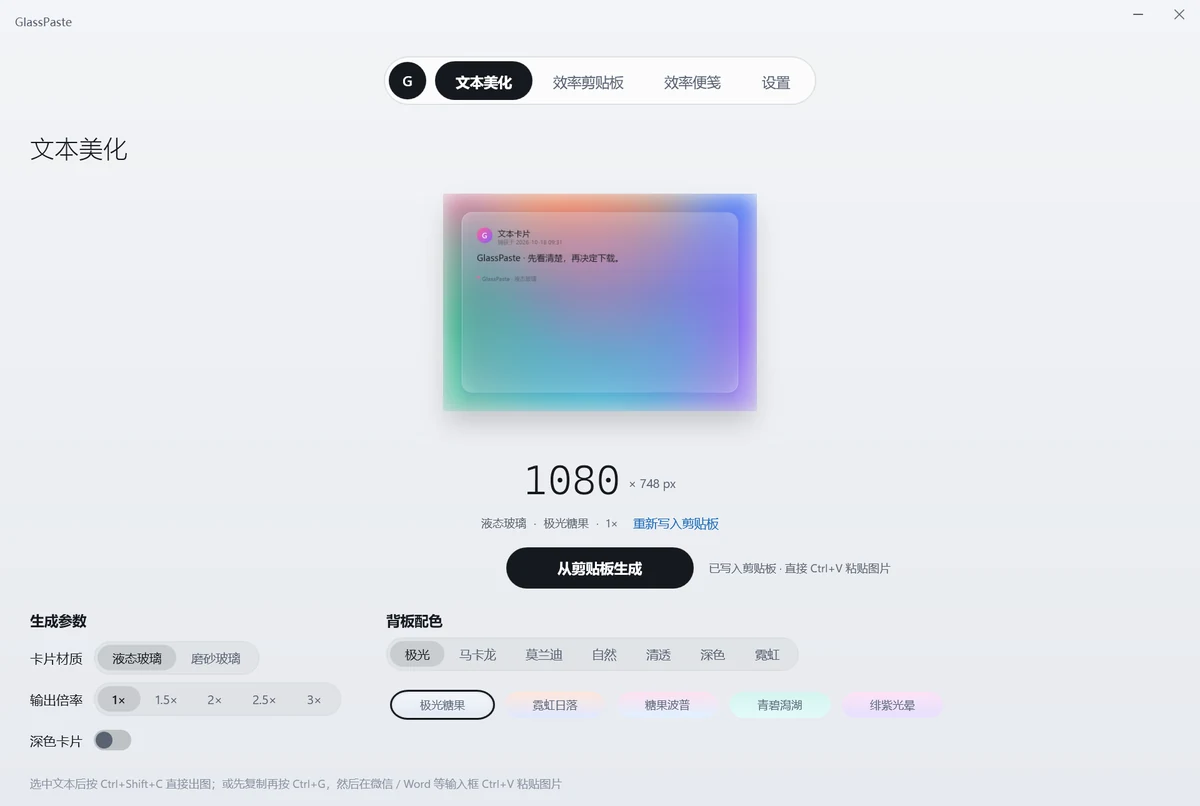
GlassPaste turns plain copied text into beautiful frosted-glass cards in seconds, while keeping your recent clippings neatly organized along your screen edge.
Supports liquid glass and frosted glass finishes with 40 curated designer backdrops. Generated cards are copied to your clipboard automatically—just press Ctrl+V to paste into chat or documents.
The built-in clipboard history features unobtrusive edge tabs: hover to preview, click to restore, and pin your favorite snippets so they never get displaced. Everything stays on your computer.
Liquid and frosted glass, with an independent dark-card switch and live preview.
Seven families — aurora, macaron, Morandi, nature, clear, dark, neon — ready to use.
Pick a scale per use: 1x for chat, 3x for high-res article covers.
Captures plain text from any app, keeps the last ten entries and restores them smoothly.
Pin frequently used text to a tab slot; clearing history keeps it safe.
All shortcuts can be re-recorded easily to match your typing flow.
| Version | v0.1.0 (Beta) |
|---|---|
| System | Windows 10 / 11 |
| Pricing | 100% Free Trial |
| Styles | Liquid glass & frosted glass, 40 curated backdrops |
| Output | Crisp PNG, direct Ctrl+V paste into chat and office apps |
| Privacy | Stored strictly on local machine, zero cloud uploads |
Select text in any app and copy it as usual.
GlassPaste reads the clipboard and renders it with the current material and backdrop.
The image is already on the clipboard — just press Ctrl+V.